A Practical Guide to Setup, Security and Community Building
Starting a Discord server is easy. But to actually build one that feels alive, safe, and welcoming is the biggest challenge. Many people think that you can simply create a few channels, invite friends, and things will run. The truth is, anyone who has managed a fast-moving gaming group or one of those constantly buzzing crypto communities knows that it's not that simple.
Whether you are looking to build a friendly hangout or a large, professional digital community, proper planning goes a long way. What we share here comes from experience watching dozens of servers grow, collapse, or completely transform based on a few simple key decisions that were made early on.
A Little Planning Goes A Long Way
1. Setting Up Your Server and Setting the Basics
Open Discord, hit the little plus sign, and you have just created your new server. Give your new server a name, upload a suitable logo and choose a region. Before inviting anyone, the first thing you should do is to ensure that you set up a proper structure.
- Welcome
- Community chat areas
- Support
- Voice channels
- Staff HQ
Simple layout works best:
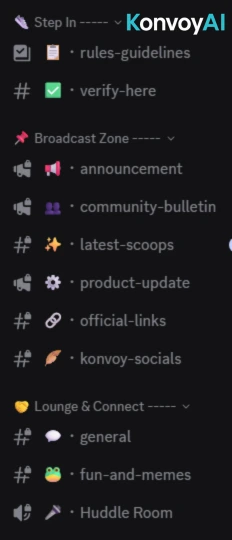
People tend to stay longer when they immediately know where to go.
Good community building starts with clarity and according to Discord's official community guidelines, servers with clear onboarding outperform those without: Discord Guidelines.
2. Add a Verification Bot to Keep the Server Safe
The moment your server goes public, bots and malicious accounts will try to slip in. Having a Discord verification bot will be your first line of defence. It checks new members before they can start navigating around the server.
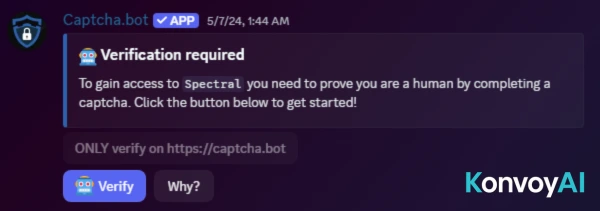
Here are some commonly used Discord verification bots:
These bots help prevent raids, filter bot accounts, and keep things clean. Without one, your server can easily get messy very quickly.
3. Add a Ticket System for Private Support
People will always be needing help, whether your server is about gaming, Web3, or a community of builders. A Discord ticket system creates a personal space whenever someone needs assistance or help.
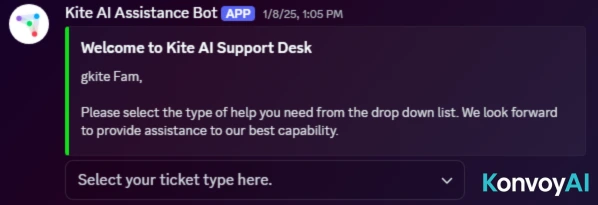
Some useful choices include:
KonvoyAI works in tandem with any Discord ticket system. This saves your moderators a lot of time by removing simple FAQs.
A solid ticket system keeps the server in check and makes support feel safe.
4. Speed Up Your Setup With Automation Tools
You can always use tools designed for auto Discord server setup if you find that manually creating channels or roles is a hassle. These tools can quickly generate a complete structure for you so that you can focus on creating the community experience instead of spending hours on server configuration.
Here are some helpful tools:
These are incredibly useful if you are intending to create multiple servers or want a clean starting point without spending too much time.
5. Protect Ownership With a Cold Account
Here's a pro tip that many server owners do not know of. The Discord account that "owns" the server has absolute total control. If you ever lose access to that account, the entire server is at risk.
A good habit is transferring ownership to a separate, low-activity "cold" account that you rarely log into. It stays safe, untouched and protected from everyday risks. Don't forget to turn on your 2FA.
Here's a simple recap on how to transfer ownership of a Discord server:
- Open server settings
- Click Members
- Select the cold account
- Press "Transfer Ownership"
It's a small move, but it adds major security.
6. Add Bots That Make Your Community Fun and Functional
Bots can genuinely change how alive a server feels and the key to that is by picking the ones that match your community's needs.
For file uploading
If your community members often share resources with each other, a Discord bot for uploading files can effectively help bypass regular limits and keep everything organised. Some options are:
For music

Voice chats are where community members gather to mingle and it can be much more enjoyable with music. Some of the best Discord music bot options people use include:
For general moderation and automation
If you want your server to keep itself tidy:
Pro Tip: KonvoyAI helps with conversational automation by taking on repeated questions and helping new users find their way around.
7. Boost Engagement by Streaming Twitter Posts Into Your Server
If your community is active on Twitter (or if your project regularly posts updates there), bringing those tweets into a dedicated Discord channel can create non-stop conversation. This is especially helpful in fast-moving crypto communities where news often spreads very quickly.
A live feed of tweets keeps the chat active and helps your members stay informed without the need to ever leave Discord.
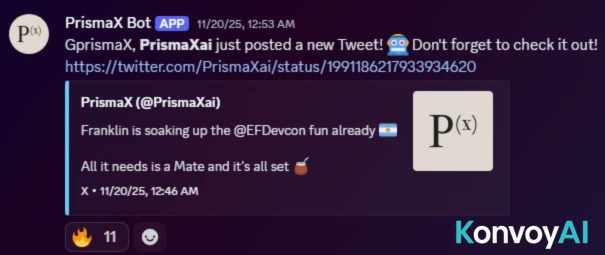
Bots that help with this include:
However, sometimes Twitter links don't preview properly, so here's how to allow Twitter links to show on Discord server:
- Ensure link previews are turned on in your settings
- Check that the channel allows "Embed Links"
- Make sure that the Twitter account is public
- Discord glitches sometimes, try reposting the link if it happens
Once previews work, Twitter will become one of the strongest engagement tools in your arsenal.
8. Scale Engagement With AI Tools Like KonvoyAI
Growing a server is one thing; keeping it active is another. When your team gets busy, conversations usually slow down. That's where AI assistants come in.
KonvoyAI is designed for community scaling. It can engage with members, take on FAQs, help new people get started and keep conversations moving even when you are asleep or busy working.

Other common AI or engagement bots you might see:
While AI can never replace the human touch, it fills the empty gaps and keeps the server from going silent, keeping the community alive.
9. Launch Your Server and Start Building Connections
Now, before opening your server to the public, make sure to have everything in place. Here's a quick checklist:
- A verification bot
- A ticket system
- Secure ownership
- Helpful utility bots
- A Twitter feed channel
- A clean layout
- Basic automations
- AI support for engagement
Once you have checked everything, invite your first wave of members and start engaging. Welcome people personally. Ask questions. Keep the chat warm and human. Communities thrive on conversations, not just configuration.
Final Thoughts
Learning how to make a Discord server is the easy part. Turning it into a genuine online home requires structure and protection. Having the right mix of bots and tools can help to make your life easier by automating the boring stuff while keeping your members engaged.
With verification, tickets, music bots, file upload tools, Twitter feeds and an AI assistant like KonvoyAI, your server has everything it needs to grow safely and steadily. If you continue showing up, welcoming new members and keeping conversations moving, your community will naturally find its rhythm.